Playbooks & data packages
This page explains the two most important Cortiq concepts after Sessions: playbooks define what the AI is supposed to look for, and data packages define what the AI is allowed to see while doing so. Together they turn Cortiq into a controlled operating environment instead of an open-ended prompt playground.
What this is
Section titled “What this is”Cortiq separates strategy from context deliberately.
A playbook is the strategy layer. It defines the setup, entry, invalidation, risk, and management logic the AI must follow on every cycle. The same playbook can drive different sessions on different symbols and accounts.
A data package is the context layer. It defines the candles, indicator values, screenshots, account state, calendar entries, and supporting documents that the AI sees when applying the playbook. Two sessions running the same playbook with different data packages will reason differently because they see different inputs.
The deliberate split is what makes Cortiq’s outputs comparable. When a session underperforms, you can change the playbook (the rules) without changing the data package (the inputs), or vice versa, and see which lever moved the result.
How it fits into Cortiq
Section titled “How it fits into Cortiq”| Concept | Lives under | Read more |
|---|---|---|
| Playbook | Playbooks → My Playbooks | Playbook design guide |
| Data package | Tools → Data Packages | Data package design guide |
| Indicators | Tools → Indicators | This page |
| Reusable supporting context | Preparation → Instrument Profiles, Prep Packages, Sentiment | Supporting context |
Both objects are referenced by sessions; one playbook can be used by many sessions, and one data package can be used by many sessions.
How to use it
Section titled “How to use it”Build a playbook section by section
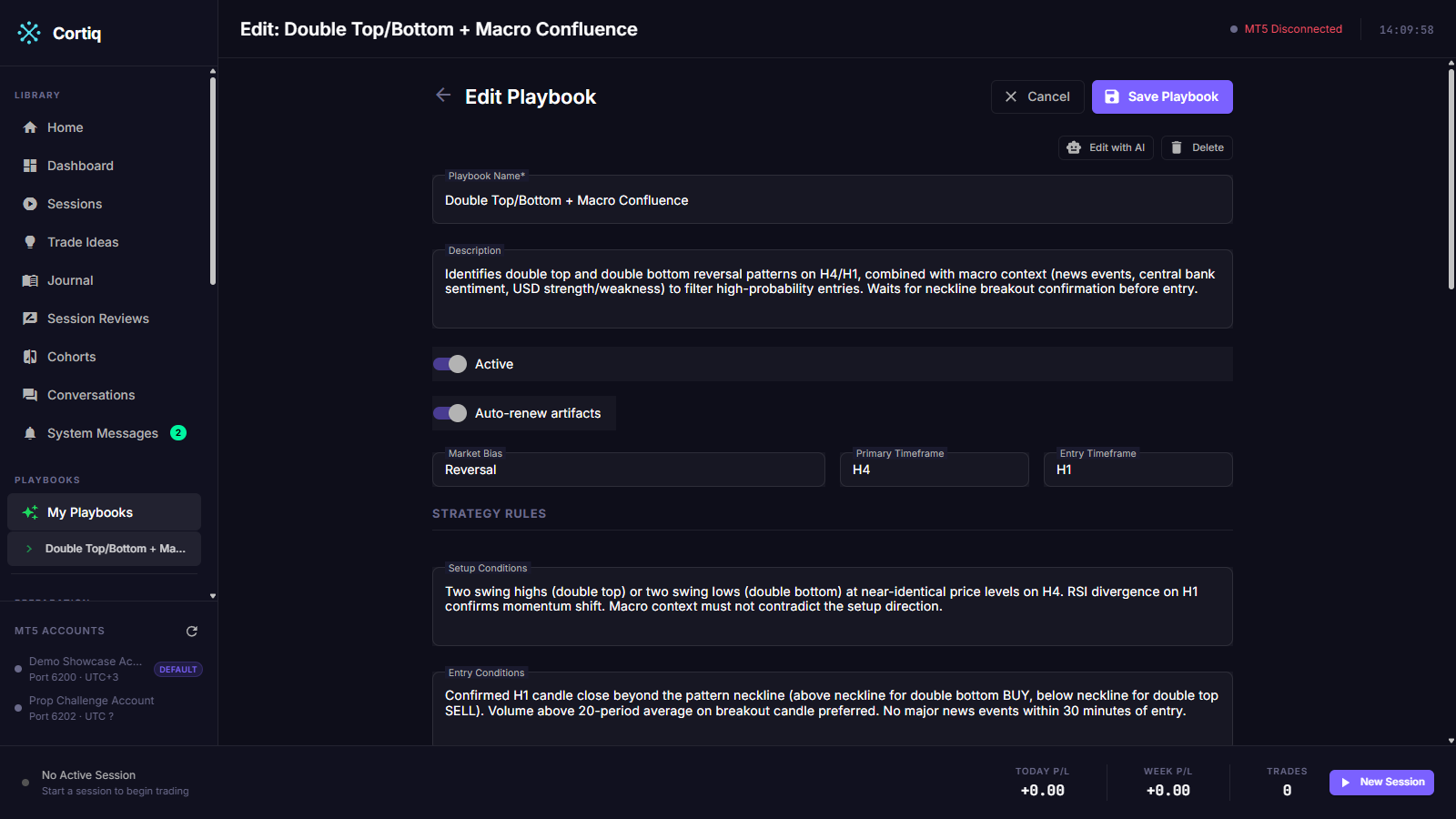
Section titled “Build a playbook section by section”A playbook is a structured document, not a paragraph. Treat each section as having one job.
| Section | What it controls |
|---|---|
| Market bias | Broad strategy type and directional context (trend following, mean reversion, etc.). |
| Primary timeframe | Where the main structural reading happens. |
| Entry timeframe | Where the actual trigger is confirmed. |
| Setup conditions | What the market must look like before the setup is valid. |
| Entry conditions | What must happen before the trade is allowed to trigger. |
| Risk rules | Stop placement, target logic, minimum reward-to-risk. |
| Trade-management rules | Trailing, scaling out, moving to break-even. |
| Invalidation conditions | When the idea is no longer valid and should be ignored. |
| Preferred symbols and sessions | Which markets and time windows the playbook fits. |
For deeper section-by-section guidance, read Playbook design guide.
Build a data package with intent
Section titled “Build a data package with intent”Data packages can include:
- Historical candles across one or more timeframes.
- Technical indicators (built-in and custom MT5 indicators).
- Chart screenshots for selected timeframes.
- Economic calendar context.
- Account state and risk settings.
- Recent trade history.
- Cross-reference symbols.
The temptation is to include everything. Resist it. A noisy data package produces noisier reasoning. Add a timeframe, indicator, or screenshot only when its absence would change the decision.
For full detail on payload weight and tier design, read Data package design guide.
Use screenshots selectively
Section titled “Use screenshots selectively”Screenshots are optional chart images captured for selected timeframes. They’re worth including when:
- Chart structure matters more than raw numbers alone.
- You want the AI to visually confirm levels, patterns, or trend shape.
- The setup depends on something that’s easier to read visually than in a candle table.
Screenshots add payload weight, so use them where visual context genuinely improves the decision — not as a default.
Use indicators and custom inputs deliberately
Section titled “Use indicators and custom inputs deliberately”Cortiq can incorporate any MT5 indicator your terminal exposes, including custom indicators. That lets the AI decision layer see the same signal stack you already use manually. Add indicators one at a time and verify the journal still reads cleanly — three carefully chosen inputs beat ten that crowd each other out.
Reference
Section titled “Reference”What well-designed playbooks share
Section titled “What well-designed playbooks share”| Quality | Why it matters |
|---|---|
| Each section has one clear job | The AI knows where to look and what to enforce. |
| Setup, entry, and invalidation are concrete | Borderline cases get decided the same way every time. |
| Management rules are explicit | The AI doesn’t improvise after entry. |
| Symbol and session preference are stated | The same playbook isn’t accidentally reused on a market it doesn’t fit. |
What well-designed data packages share
Section titled “What well-designed data packages share”| Quality | Why it matters |
|---|---|
| Each timeframe earns its place | Reduces noise without losing structure. |
| Indicators have a stated job | Avoids overlapping or contradicting signals. |
| Screenshots only where visual matters | Keeps the payload light enough to reason on. |
| Supporting context is layered, not pasted | Keeps the prompt readable and the AI focused. |
Common failure modes
Section titled “Common failure modes”Without disciplined playbooks and data packages, AI trading workflows fail in two predictable ways:
- Too little structure — the AI has wide latitude and improvises too much.
- Too much context — the AI has so much input that signal quality drops.
Both problems are configuration-side, not provider-side. Better playbooks and tighter data packages fix more cycles than swapping providers does.
What to read next
Section titled “What to read next”- Playbook design guide — disciplined section-by-section playbook authoring.
- Data package design guide — payload tiers, timeframe choice, and screenshot discipline.
- Sessions — where playbooks and data packages get bound together at runtime.
- Supporting context — preparation packages, instrument profiles, sentiment reports.