Risk management
This page explains Cortiq’s risk system: a dual-layer control plane that sits above the AI decision and the MT5 execution. By the end you’ll know what each limit does, what happens at a breach, and how to configure rules that genuinely protect the workflow.
What this is
Section titled “What this is”Cortiq does not assume a good AI response is enough. Every trading system needs an independent control layer above execution, and that layer is built into the product.
The risk system is dual-layer. Global limits apply across every connected MT5 account; per-account limits apply to one account in isolation. Both layers run on every closed trade, so a single trade can simultaneously be allowed under your global rules but breach a per-account rule, or vice versa.
The two layers exist because most operators have at least two simultaneous mandates: a whole environment mandate (don’t let total daily drawdown exceed X) and a per-account mandate (don’t let prop-firm Account A exceed its specific challenge limits). Mixing the two into one rule set produces rules that are wrong for both.
How it fits into Cortiq
Section titled “How it fits into Cortiq”flowchart TB
T(Closed trade<br/>on Account A) --> G[Global<br/>RiskValidator]
T --> P[Per-account<br/>RiskValidator A]
G --> Gd{Global<br/>limit breach?}
P --> Pd{Account A<br/>limit breach?}
Gd -->|yes| Gs(Stop all sessions<br/>cancel all pending orders)
Gd -->|no| ok1[Continue]
Pd -->|yes| Ps(Stop sessions on Account A<br/>cancel Account A pending orders)
Pd -->|no| ok2[Continue]
Each closed trade is recorded in both validators. The two breach paths are independent: a global breach stops every account; a per-account breach stops only that account.
Risk is visible in two screens:
Tools→Risk Management— configure global and per-account limits.Library→Dashboard— monitor real-time risk usage across the environment.
How to use it
Section titled “How to use it”Configure global limits first
Section titled “Configure global limits first”Open Tools → Risk Management and select the Global tab. Set conservative defaults before any live execution.
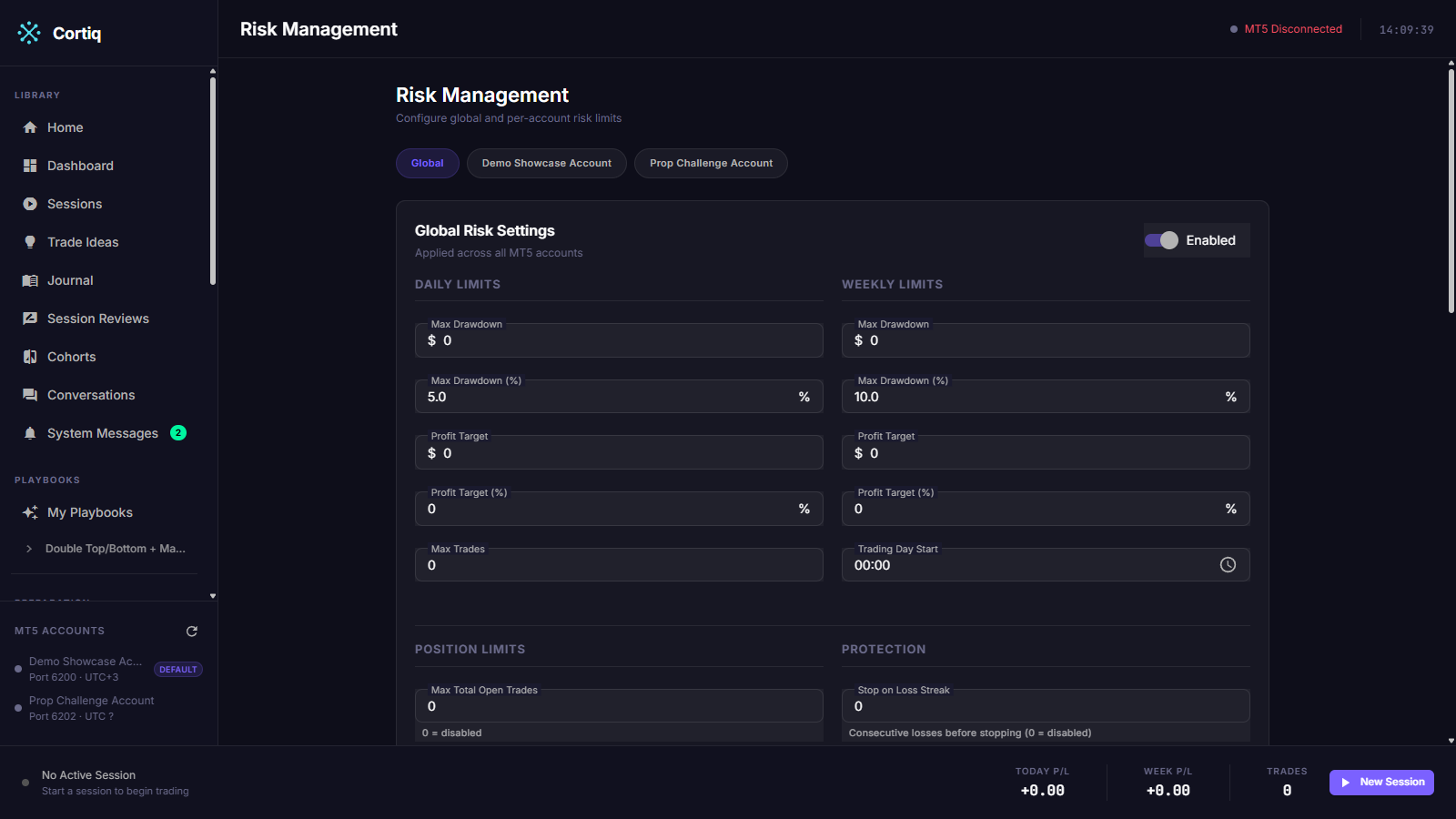
Conservative is not optional. Tighten until you’d be comfortable with the worst-case loss the rule allows; you can always loosen later, but you can’t undo a breach that exceeded a too-wide limit.
Configure per-account limits
Section titled “Configure per-account limits”Switch to the Per-Account tab and configure rules for each MT5 account independently. Use this to encode account-specific mandates: prop-firm challenge limits, a personal account’s daily drawdown, a secondary account’s max exposure.
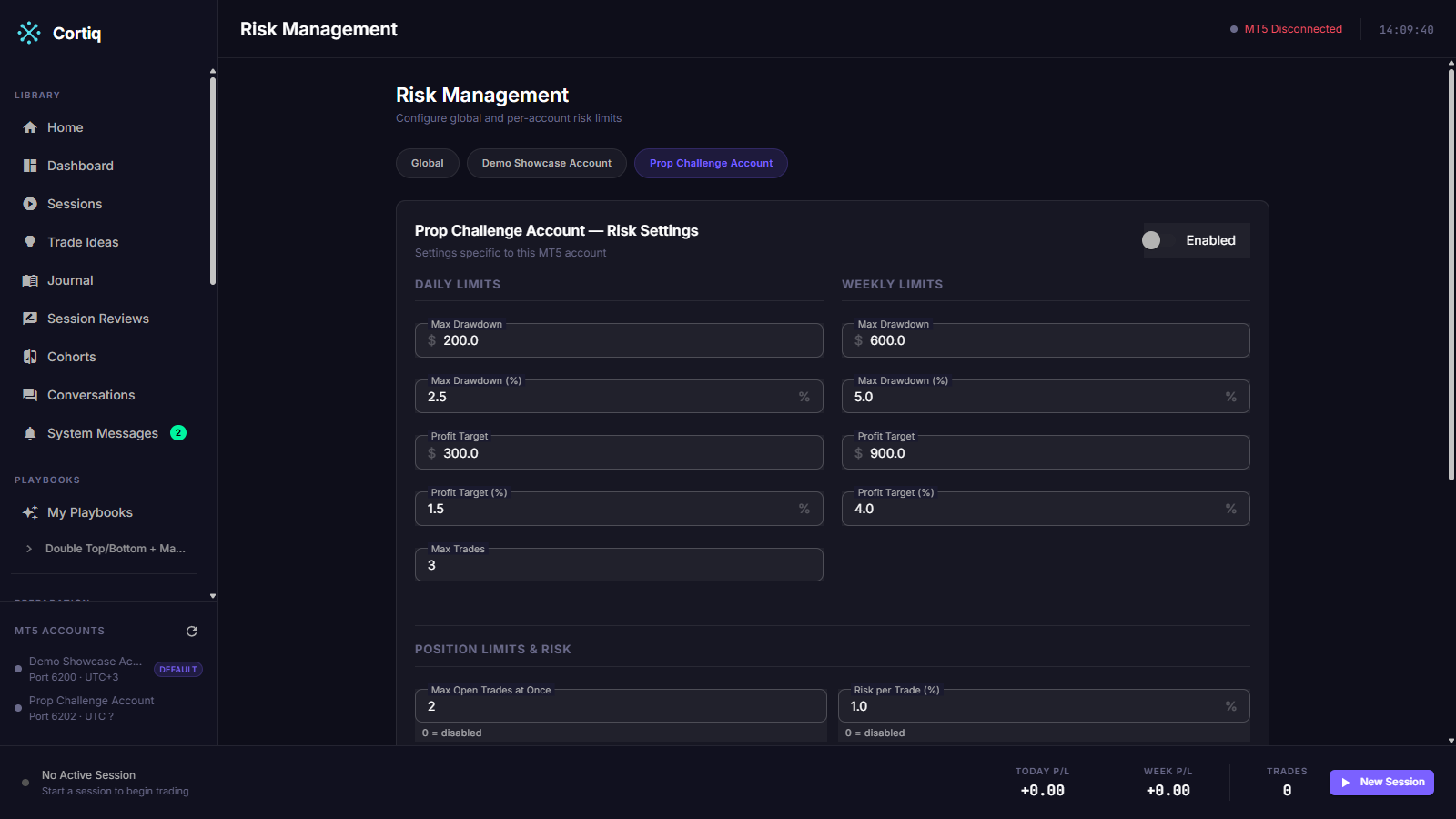
Configure your day-start time
Section titled “Configure your day-start time”Risk validators reset their daily counters at a configured local time, not at OS midnight. Set the day-start time to match your trading day (often 22:00 UTC for FX). The wrong day-start time silently makes “daily drawdown” mean something else than you expect.
Watch for RiskPaused sessions
Section titled “Watch for RiskPaused sessions”When a validator triggers, the affected sessions transition to RiskPaused. Don’t manually unpause — the platform resumes them automatically when the breach condition clears (for example, the next trading day starts). Stop the session manually if you genuinely want to override.
Reference
Section titled “Reference”Limits the platform enforces
Section titled “Limits the platform enforces”| Limit | Layer | Triggers when |
|---|---|---|
| Maximum daily drawdown | Global, per-account | Total realized + unrealized loss exceeds the configured percentage. |
| Maximum weekly drawdown | Global, per-account | Loss across the rolling week exceeds the configured percentage. |
| Daily profit target | Global, per-account | Cumulative daily P/L meets the configured target. |
| Weekly profit target | Global, per-account | Cumulative weekly P/L meets the configured target. |
| Maximum daily trade count | Global, per-account | Closed-trade count for the day reaches the limit. |
| Maximum total open trades | Global, per-account | Concurrent open positions reach the limit. |
| Maximum trades per symbol | Per-account | Concurrent positions on one symbol reach the limit. |
| Maximum symbol exposure | Per-account | Combined exposure on one symbol exceeds a percentage of equity. |
| Default risk per trade | Per-account | New orders sized above the default risk percentage are blocked. |
| Stop-on-loss-streak | Per-account | Consecutive losing trades reach the configured count. |
| Include manual trades | Both | Toggle: count manual MT5 trades against the same validators. |
What happens on a breach
Section titled “What happens on a breach”| Layer | Effect |
|---|---|
| Global | Cancels all pending orders, risk-pauses every running session. |
| Per-account | Cancels the affected account’s pending orders, risk-pauses that account’s running sessions. Other accounts continue. |
In both cases the affected sessions move to RiskPaused and the breach is logged with the trigger condition.
The emergency-stop circuit breaker
Section titled “The emergency-stop circuit breaker”When a hard limit breaches, an emergency-stop service fires before the next trade can compound the loss. It is the circuit breaker that sits between a breach and your account:
- It cancels pending orders — every account on a global breach, only the affected account on a per-account breach. When
Include manual tradesis off, only orders linked to Cortiq sessions are cancelled. - It risk-pauses every session currently
Runningin the breached scope.
A separate unrealized-P/L monitor complements this by polling open positions on a short interval and force-closing them when the realized plus unrealized total breaches a daily drawdown or profit target — so a single open position can’t drift far past the limit between closed trades. Soft limits (trade count, loss streak, max open trades, symbol exposure) reject the next order but do not trip the circuit breaker.
Common questions
Section titled “Common questions”My session is RiskPaused — should I resume it?
No. The pause exists because a limit was hit. Either let the validator auto-resume (when the daily counter resets, for example), or stop the session and review the journal before changing the limit.
Risk limits applied but I see a loss bigger than the daily drawdown — why? Validators run on closed trades. An open position can drift past the daily drawdown intra-trade; the validator triggers when the loss is realized or when the unrealized loss is checked at cycle end. To enforce a hard intra-bar stop, set protective SLs on the positions themselves.
Do risk limits apply to External MCP sessions? Yes. Both autonomous and external sessions go through the same validator pipeline before any order reaches MT5.
What to read next
Section titled “What to read next”- Sessions —
RiskPausedand the rest of the session lifecycle. - Execution modes & notifications — virtual mode rehearses risk behavior without using capital.
- Journal & analytics — review breaches before adjusting limits.