Backtesting
Backtesting replays a session over a historical period and simulates the resulting positions in memory instead of sending orders to MT5. A backtest of an autonomous session calls the same AI stack it would call live; a backtest of a manual session hands the controls to you. By the end of this page you’ll know how to start a run of either kind, step a replay by hand, and read the coverage grid and cycle timeline.
What this is
Section titled “What this is”A backtest takes an existing AISession — its symbol, playbooks, data package, and pinned context packages — and runs it against historical M1 candles over a UTC window you choose. The engine streams those candles in batches, uses the AI’s own nextTrigger directives to decide when to call the model again, and books the trades the AI opens into an in-memory position simulator.
Nothing is sent to MetaTrader 5. The run measures what the same session would have done over that period, including SL/TP exits, pending-order activation, and management actions, all priced from M1 high/low.
Runs execute in a background service and persist to local SQLite. You can leave the page while a costly run continues, then return to History to inspect the saved parameters, simulated trades, AI cycles, warnings, and final metrics. The cycle journal is rich enough to trace a dropped trade — a decision that intended to trade but produced no executable order is recorded as a visible cycle with an explicit drop reason, never silently discarded.
Two kinds of replay
Section titled “Two kinds of replay”The replay mode follows the type of the session being backtested — there is no separate mode selector.
| Manual replay | Autonomous replay | |
|---|---|---|
| Who trades | You, from the order ticket | The AI decision cycle |
| Advancing the replay | You, with step and play controls | The engine, as it consumes candles |
| Setup requirements | None beyond a symbol and a window | Playbook, data package, and artifact coverage |
| AI token cost | None | Charged per cycle by your provider |
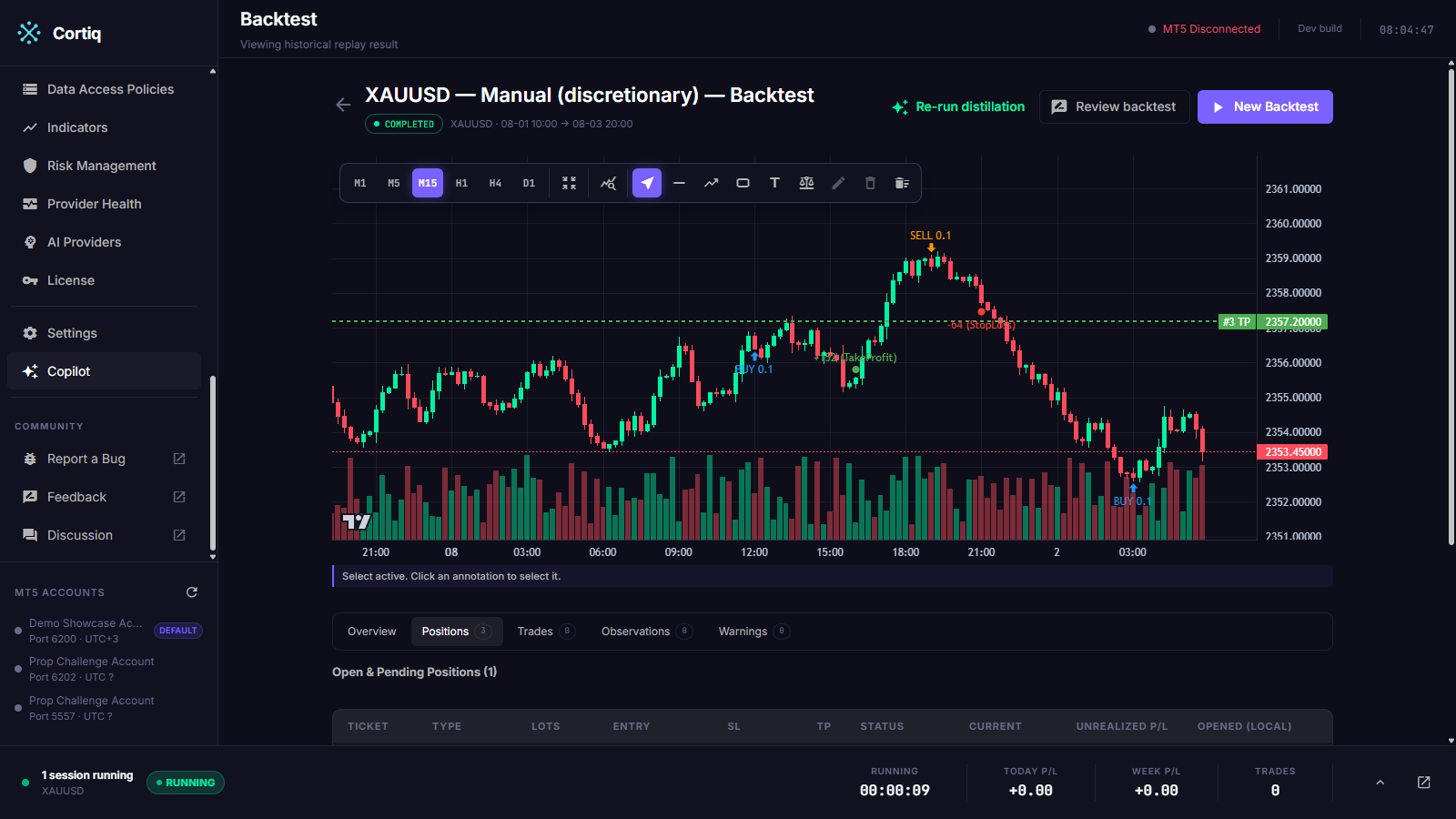
Both open directly onto a chart.
Stepping a manual replay
Section titled “Stepping a manual replay”A manual run starts paused and consumes no data until you ask for a candle.
- Step reveals the next candle on the chart’s timeframe.
- Play advances continuously until you pause.
- The order ticket works exactly as it does in a live session, except orders execute in the simulator at the current replay time.
Positions you open are attributed to you rather than to the AI, so a run’s trade list distinguishes the two.
How it fits into Cortiq
Section titled “How it fits into Cortiq”A backtest reuses the live trading cycle end to end. It calls the same prompt builder, the same provider, and the same response parser the session uses live, and it never tells the model it is being simulated — a model that knows it is being evaluated may behave differently and distort the result.
| Aspect | Live session | Backtest |
|---|---|---|
| Market data | Live MT5 stream | Historical M1 candles, replayed |
| Order routing | Real orders to MT5 | In-memory position book |
| License | Required | Not required |
| Clock | Real time | Replay clock over your UTC window |
| Context layers | Live as-of now | As-of the candle date, no lookahead |
Because backtests can spend real provider tokens, the service runs one active background run at a time and rejects a second start until the current run finishes or is cancelled.
How to use it
Section titled “How to use it”1. Open Backtests and pick a session
Section titled “1. Open Backtests and pick a session”Open Preparation → Backtests, or navigate to /backtests. The list shows recent persisted runs with status, P/L, period, cycle count, and an unread dot for runs that finished in the background while you were away.
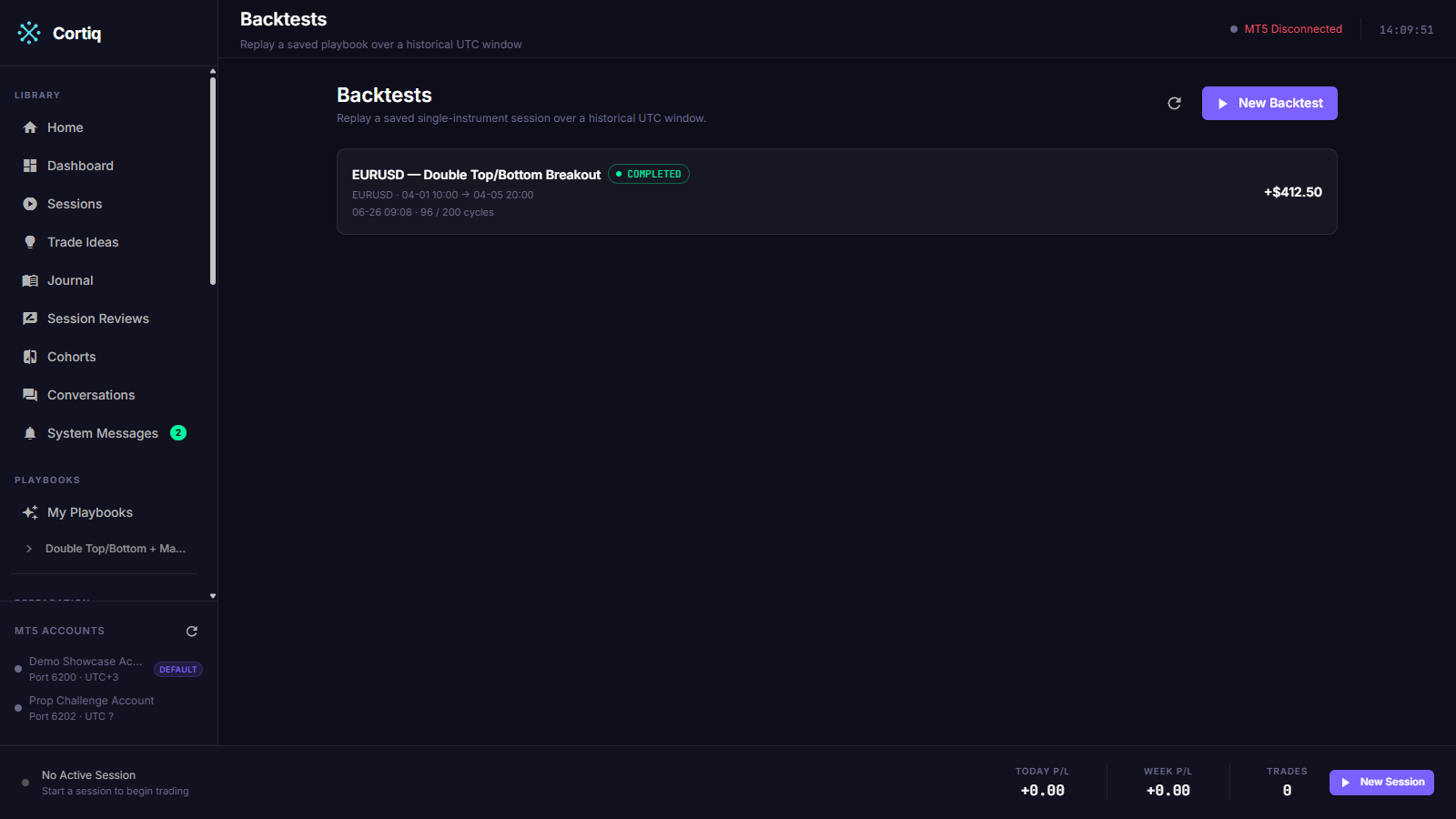
Select New to start a run. A backtest always targets an existing session, so the session carries the symbol, playbooks, and pinned packages into the run.
2. Define the window and acknowledge the warnings
Section titled “2. Define the window and acknowledge the warnings”Choose the session, then set the UTC period with the start and end fields. You enter the period in your local machine time; Cortiq converts it to UTC once before the engine sees it, and converts back to local for every display.
Editable run settings expose the max-cycle cap and the M1 batch size. Lot fallback, tick size, and tick value are derived from the session’s MT5 symbol metadata — they are not operator inputs.
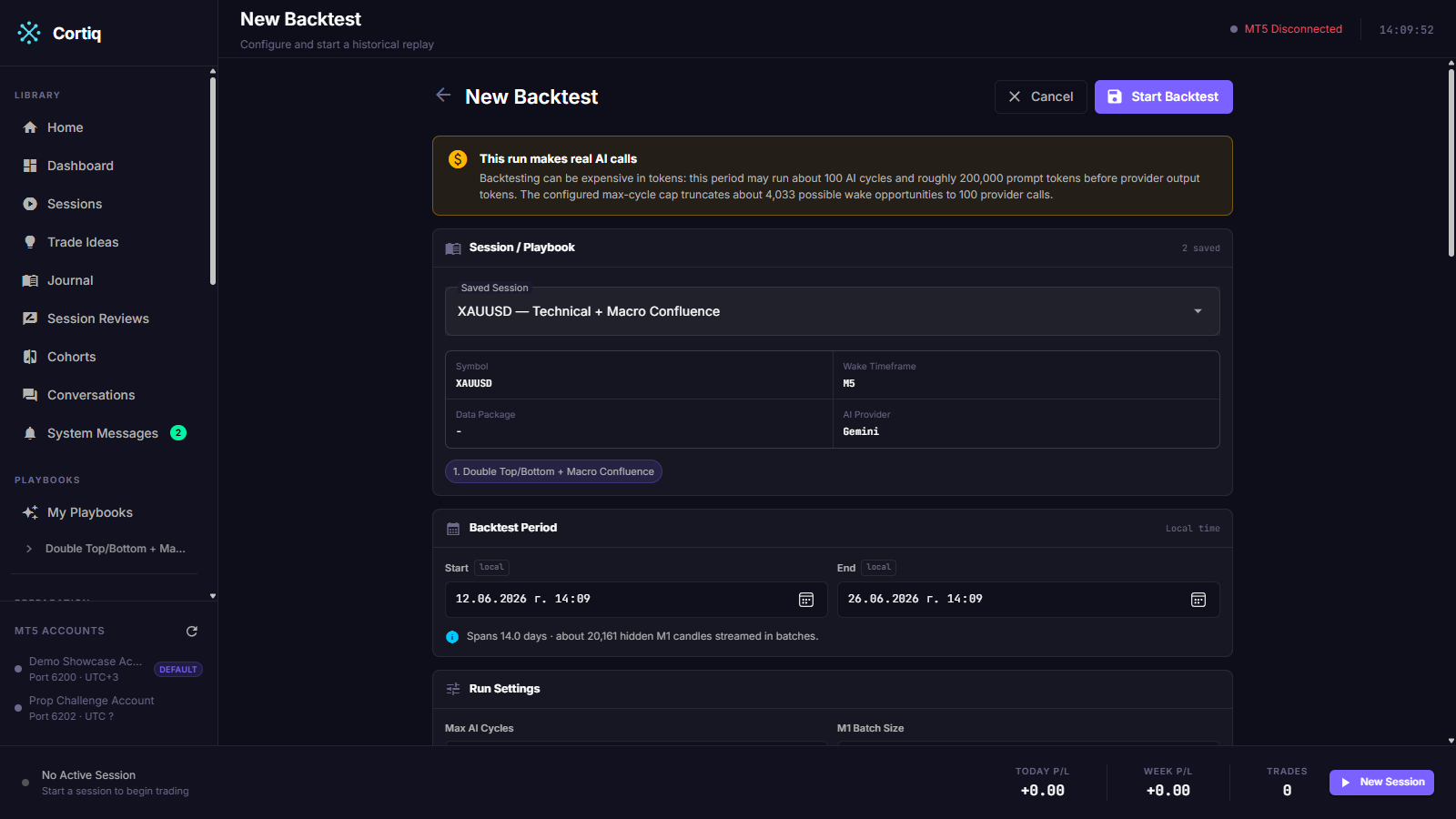
Start stays disabled until the selected session has a data package, the period validates, and you acknowledge the run warnings (real token cost, M1 approximation, latency, SL-first exit ordering, and historical-indicator safety).
3. Fill any required coverage gaps
Section titled “3. Fill any required coverage gaps”If the session’s playbooks require a context layer — preparation, sentiment, or instrument profile — the new-backtest page renders a coverage grid: a per-day ✓/✕ matrix per pinned package across the whole window.
A missing cell offers click-to-generate, which backdates that artifact to the day in question (stamped with an effective date so the engine selects it without lookahead). A Generate all missing action fills the row. Where a layer is Required, any uncovered day blocks Start until it is filled; an Optional layer never blocks and is omitted on days it has no artifact.
4. Start, then pause or resume
Section titled “4. Start, then pause or resume”Starting hands the run to the background service and returns you a running state; the page polls history while the run is active. Navigating away does not cancel it.
While a run is Running you can Pause it. The current in-flight AI call finishes, then the candle loop parks at the next boundary and the status persists as Paused. Resume continues from exactly that boundary with no state lost. Cancel is valid from both Running and Paused.
5. Read the result
Section titled “5. Read the result”A completed run opens at /backtests/{id} with the coverage grid and the cycle timeline. Result tabs cover the overview metrics, simulated trades, AI cycles, warnings, and the frozen settings the run used.
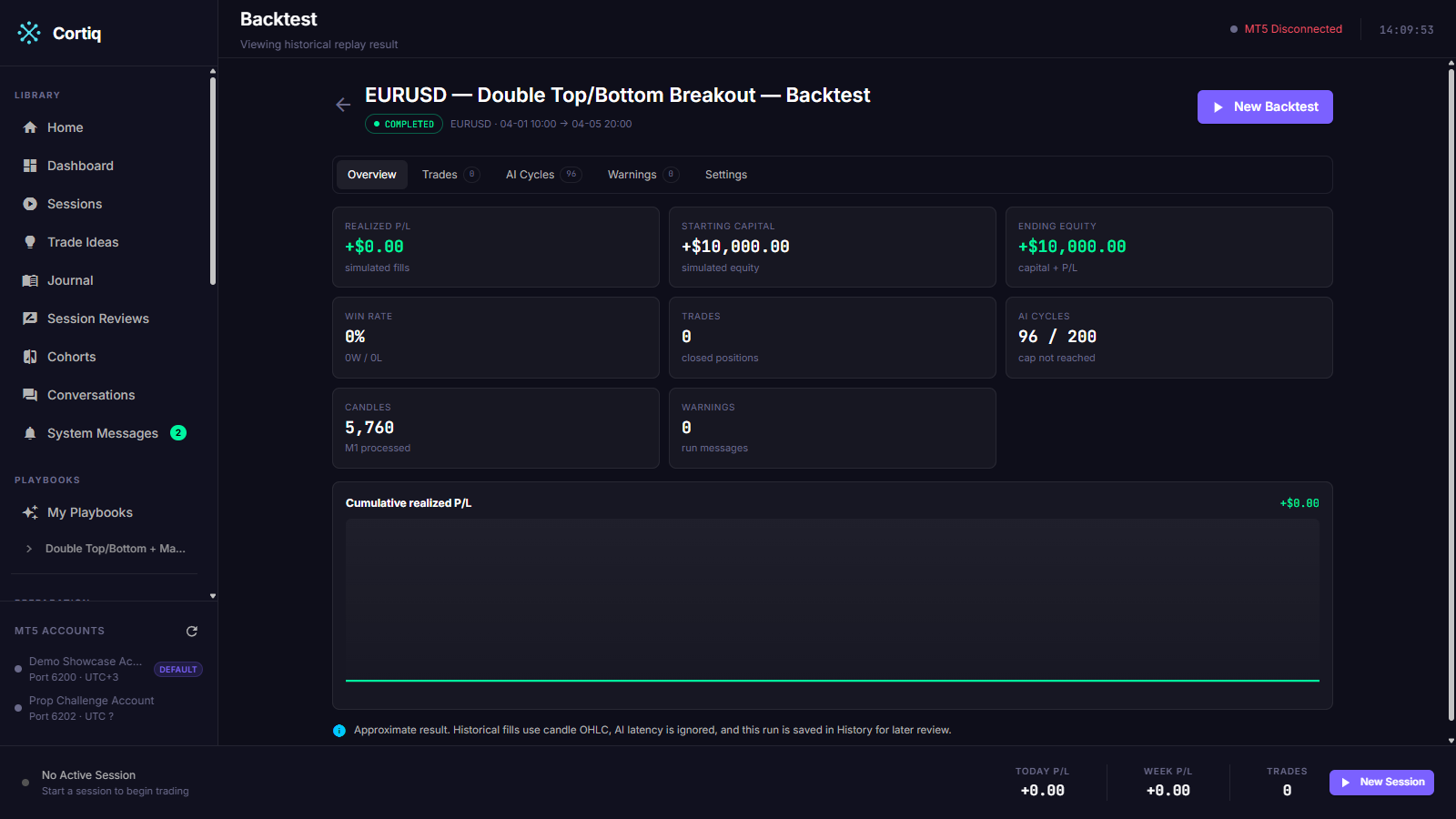
The AI-cycles view uses the same timeline component as a live session, so cycle action chips (BUY / SELL / WAIT / MANAGE) read identically. Cycles that intended a trade but opened nothing render with a distinct marker and carry the drop reason, including risk rejects prefixed [Risk] or [Risk halt].
Reference
Section titled “Reference”Run status values
Section titled “Run status values”| Status | Meaning |
|---|---|
Queued | Run record written, background task not yet started. |
Running | The replay loop is active. |
Paused | Operator paused at a candle boundary; resumable in-process. |
Completed | Replay finished and results persisted. |
Cancelled | Operator cancelled; open positions force-closed and partial results kept. |
Failed | Run errored, or orphan recovery found it interrupted by an app restart. |
Cycle outcomes
Section titled “Cycle outcomes”| Outcome | Meaning |
|---|---|
Wait | No trade intent this cycle. |
Opened | A position was opened. |
IntendedNotOpened | The AI flagged a trade but produced no executable order; carries a drop reason. |
Managed | A management action (CLOSE / MOVE_SL / MOVE_TP) was applied. |
Error | The cycle errored or the response was unparseable; carries a drop reason. |
What a backtest does not reconstruct
Section titled “What a backtest does not reconstruct”| Limitation | Detail |
|---|---|
| Account balance / margin / drawdown | Not reconstructed historically; equity is tracked as starting capital plus realized P/L. |
| Intra-minute tick order | M1 OHLC cannot know tick sequence; SL is checked first as the conservative default. |
| Durable pause | Pause and resume are in-memory; an app restart fails a paused run. |
| Historical news | Depends on MT5 economic-calendar availability for the requested window. |
Common questions
Section titled “Common questions”Do I need a license to run a backtest? No. Backtests are the only license-free path. Any session bound to MT5 needs a valid license; a backtest never reaches MT5.
Why did my run finish with fewer cycles than I expected? The run respects a max-AI-cycle cap and hard first-slice limits on candle volume. If the cap stopped the run, the result records it. Lower the window or raise the cap.
A required coverage cell won’t generate for a future date — why? Backdated artifacts cannot be stamped with a future effective date. A day later than today is skipped; pick a window that ends on or before today.
What to read next
Section titled “What to read next”- Sessions — the session a backtest replays, and its lifecycle states.
- Playbooks & data — the playbooks and data package that drive every cycle.
- Journal & analytics — how live runs are recorded once you go past simulation.