Skills
A skill is a reusable Markdown instruction template that shapes how the AI executes a creation flow — generating a preparation package, an instrument profile, a sentiment report, a journal analysis, a playbook, or a research run. By the end of this page you’ll know how to author a skill, how categories control where it appears, and how Cortiq injects skill text safely.
What this is
Section titled “What this is”Each skill is a small record: a name, a description, one category, a Markdown body, and an enabled flag. When you select skills for a creation operation, their bodies are injected into that operation’s prompt. Write a skill once, and every generation that uses it inherits the same standing guidance — your house style for a profile, the checklist you want every preparation run to follow.
Skill text is treated as untrusted data injected into a trading agent’s instruction set. Cortiq fences each body inside a labelled <operator_skills> block marked as preferences only, places it ahead of the base prompt so the base prompt’s hard constraints come last, and bounds its length. A skill can tilt how the AI works; it can never override risk limits, safety rules, or the required output format.
The Copilot sees a catalog of every enabled skill on every turn. It can suggest a relevant one, inspect a skill before applying it, and offer to create one when it notices you repeating an approach.
How it fits into Cortiq
Section titled “How it fits into Cortiq”A skill is the reusable layer beneath the creation flows. Where a playbook tells a session what setups are valid, a skill tells a generator how to do its job — and the same skill can apply across many runs.
| Concept | Scope | Shapes |
|---|---|---|
| Skill | Reusable template | How a creation flow generates an artifact |
| Playbook | Per strategy | What setups a session may trade |
| Preparation / profile / sentiment | Per instrument | The context a session reads each cycle |
The category on a skill is a filter, not a behaviour switch. It decides which creation flow shows the skill in its picker: Research, Preparation, InstrumentProfile, Sentiment, Journal, Playbook, or Copilot. Regardless of category, the Copilot’s catalog always lists every enabled skill.
How to use it
Section titled “How to use it”1. Browse and create skills
Section titled “1. Browse and create skills”Open Preparation → Skills, or navigate to /skills. The list shows your skills with their category and enabled state.
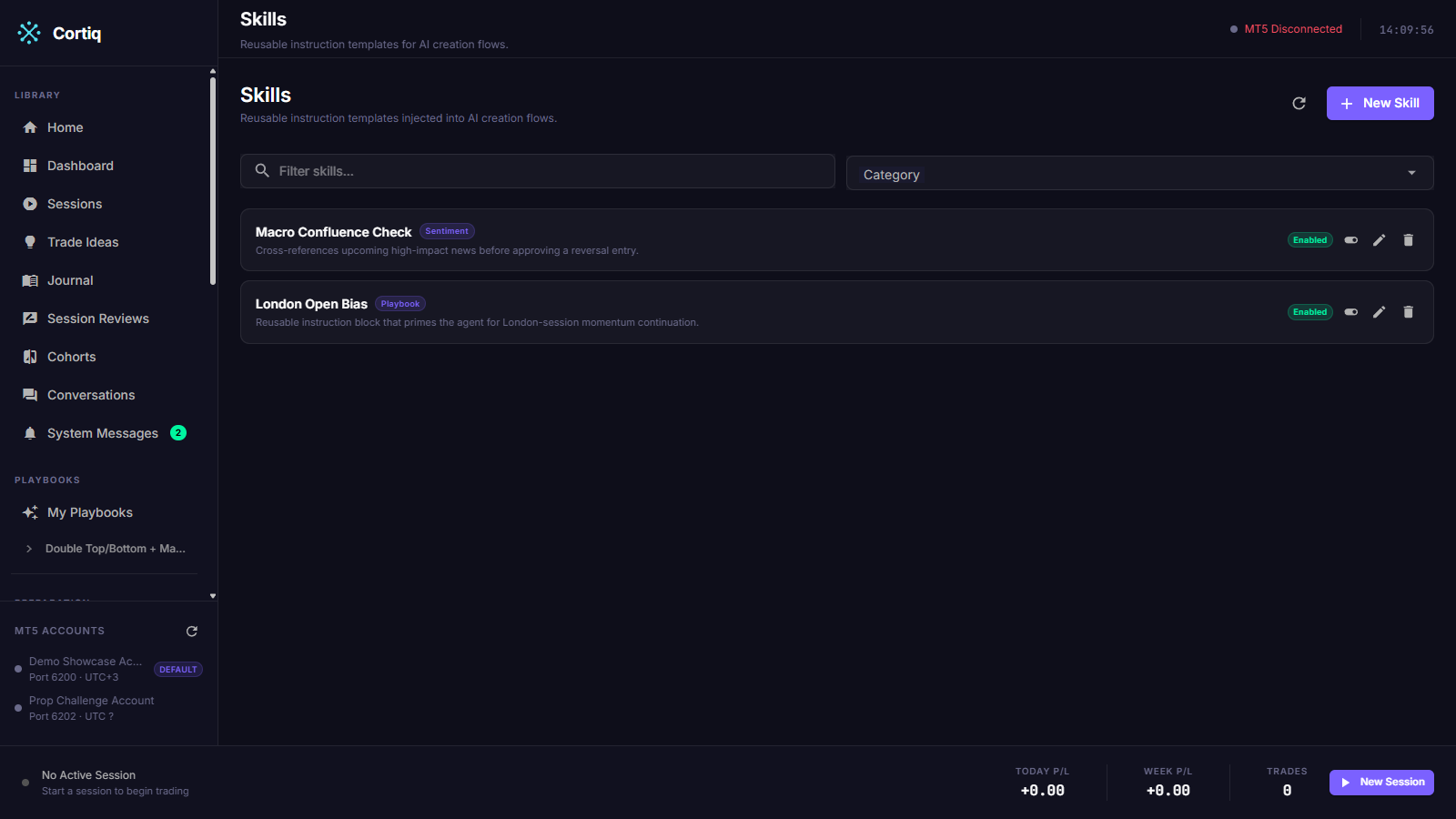
Select New (/skills/new) to author one. Give it a name, a description, a single category, and the Markdown body that holds the actual instructions.
2. Write the body
Section titled “2. Write the body”The body is plain Markdown — the standing guidance you want the AI to follow whenever this skill is applied. Keep it focused: one skill, one job. Length is bounded (description up to 1,000 characters, body up to 20,000), enforced consistently in the editor, the MCP layer, and the database.
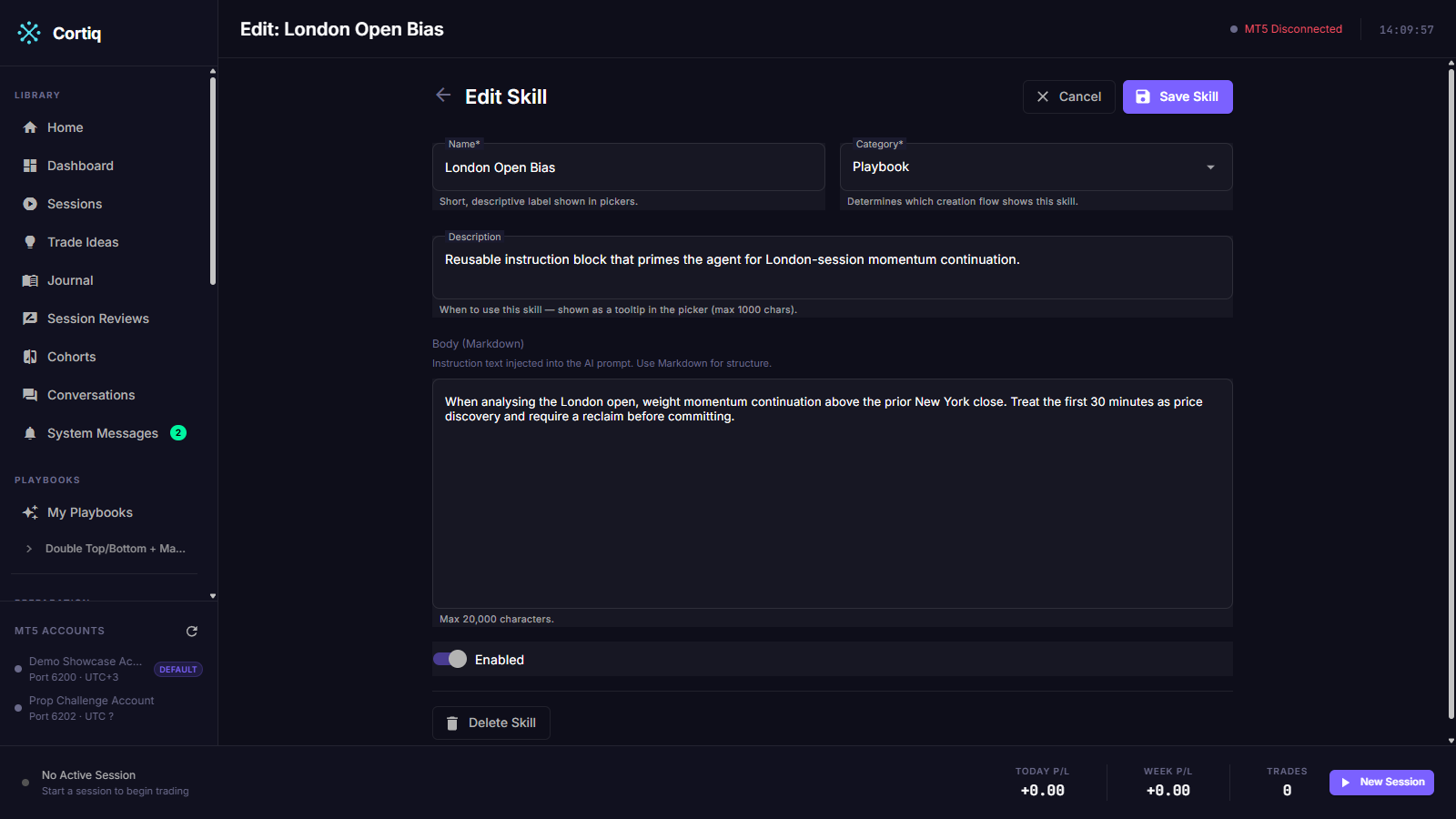
The Copilot can author directly into the open editor. It can set a field or apply a draft and request a save, so you can dictate a skill conversationally and watch it fill in.
3. Apply skills in a creation flow
Section titled “3. Apply skills in a creation flow”The six creation pages — Research, Preparation, Instrument Profile, Sentiment, Journal, and Playbook — mount a skill picker that lists the enabled skills for that page’s category. Select the ones you want; their bodies are threaded into that page’s generation call.
4. Let the Copilot manage skills
Section titled “4. Let the Copilot manage skills”The Copilot can list and load skills, and create, update, or delete them. None of these is approval-gated — Cortiq’s own MCP tools are trusted, and only trade execution sits behind an approval card. The Copilot is told to suggest a skill, inspect it before applying, and offer to create one when you repeat an approach — suggest, not force.
Reference
Section titled “Reference”Skill categories
Section titled “Skill categories”| Category | Picker appears in | Notes |
|---|---|---|
Research | Research run form | |
Preparation | Preparation package generation | |
InstrumentProfile | Instrument profile generation | The only flow that logs applied skill names. |
Sentiment | Sentiment report generation | |
Journal | Journal analysis generation | |
Playbook | Copilot only | No page picker; reaches generation via the Copilot catalog. |
Copilot | Copilot only | Marks Copilot-only skills with no creation flow. |
Skill record fields
Section titled “Skill record fields”| Field | Detail |
|---|---|
| Name | Short identifier shown in pickers and the catalog. |
| Description | Up to 1,000 characters; shown in the catalog to help selection. |
| Category | Exactly one; controls picker visibility. |
| Body | Up to 20,000 characters of Markdown; the injected guidance. |
| Enabled | Disabled skills are hidden from pickers and the catalog. |
Common questions
Section titled “Common questions”Where does a skill’s text end up in the prompt?
Inside a fenced <operator_skills> block placed ahead of the base prompt, labelled as user-supplied preferences. The base prompt’s hard constraints come last, so they win.
Can a skill change my risk limits or force a trade? No. Skill bodies are preferences only. They cannot override risk limits, the output format, or session rules, and they do not touch the trade-execution approval gate.
Why doesn’t my Playbook skill show a picker on the playbook editor?
Playbook generation is Copilot-driven and has no LLM-calling service to inject into. A Playbook skill reaches a generation through the Copilot’s global catalog instead.
What to read next
Section titled “What to read next”- Research — a creation flow where skills shape a deep run.
- Playbooks & data — the artifacts skills help you generate.
- Cortiq Copilot — the agent that can author and apply skills.