Research
Research is where you do deep work on one instrument: prepare a reusable dataset, study how the market behaves, test whether an idea holds up, or watch history and let Cortiq surface what keeps recurring. By the end of this page you’ll know the two tabs on the Research page, the three kinds of run, how a grounded answer reads, and how to hand a finished run to the Copilot.
Research is upstream of the trading cycle. A session trades; research is where the thinking that shapes a session happens, then feeds back in as a playbook, an instrument profile, or preparation context. Findings also flow into the Instrument Hub knowledge ledger for the market.
What this is
Section titled “What this is”The Research page has two tabs that share one instrument filter:
- Research Runs — the deep AI passes over one instrument, and their results.
- Data Files — reusable parquet datasets the runs read from.
Every run reads its market data from one or more managed data files rather than authoring data from scratch each time. Cortiq owns the hidden research prompt; anything you type is additional instruction layered on top, treated as untrusted notes — it can’t override the research rules, the data validation, or the guardrails.
The symbol is validated against your default MT5 account’s catalog when you start a run, so a typo or an unknown symbol is rejected with suggestions rather than silently producing nothing. A run that expected candle data but received none fails loudly instead of fabricating output.
How it fits into Cortiq
Section titled “How it fits into Cortiq”| Surface | Cadence | Produces |
|---|---|---|
| Research | Occasional, deep | Findings, edge tests, drafts you hand off |
| Instrument Hub | Always | The per-market view research feeds |
| Playbooks & data | Per strategy | The rules a session executes |
| Sessions | Continuous | Live or simulated trading |
Managed data files
Section titled “Managed data files”A managed data file is a reusable, pre-built parquet dataset owned by you, not a by-product of a single run. Preparing a file once — then reusing it across many runs — keeps your research grounded in the same, inspectable data. A file stores:
- a symbol and timeframe,
- the base candle columns you want (open, high, low, close, tick volume),
- selected indicators, each with its own parameters (for example
period=14), - named custom columns you describe in plain language,
- an editable pandas build script,
- the latest built parquet plus a preview of its first rows.
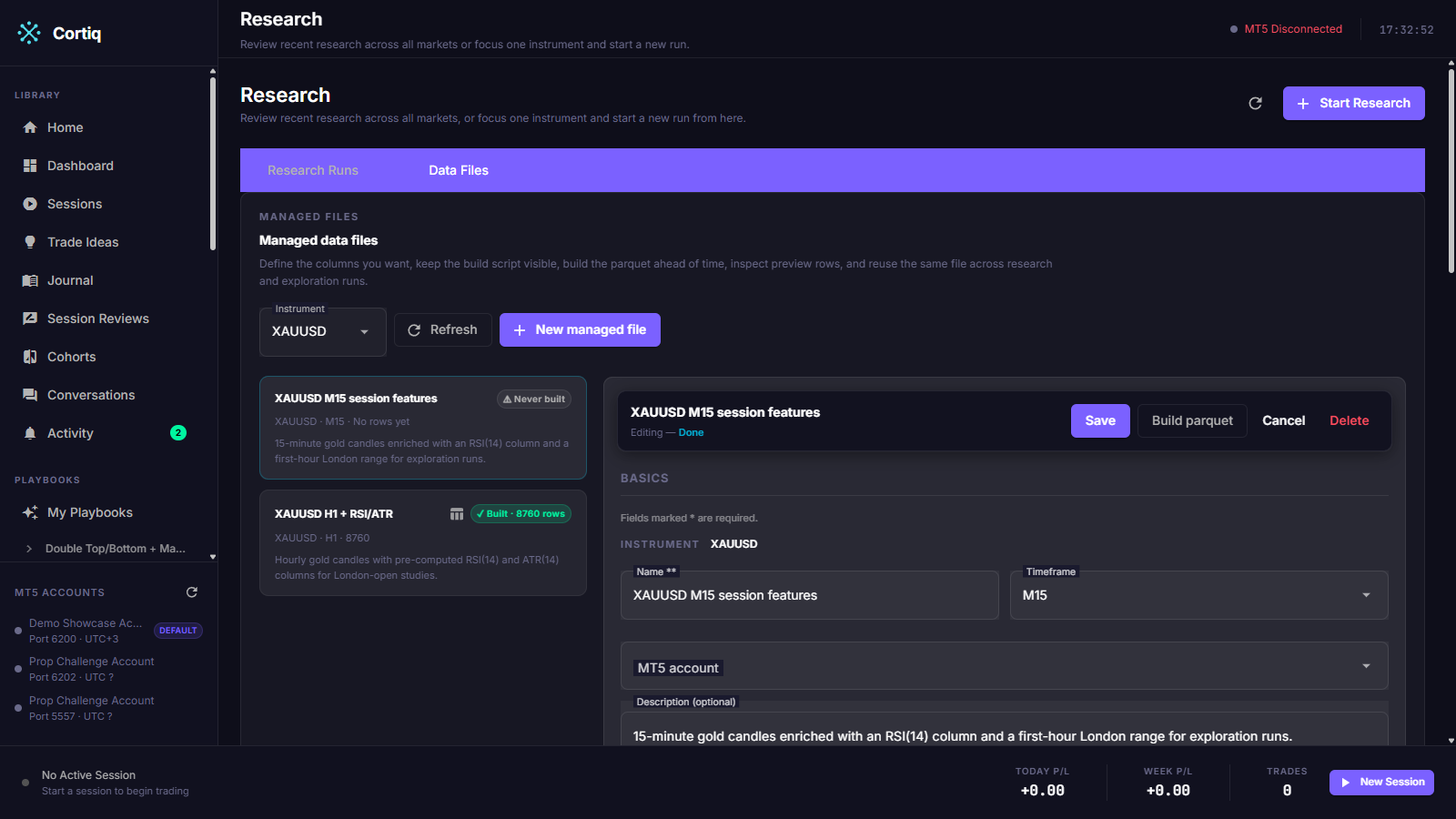
Open Preparation → Research, filter to an instrument, and select the Data Files tab. Each file is a card with its name, timeframe, and a build-status chip — ✓ Built · N rows, ⚠ Never built, or ✗ Build failed. The editor on the right groups into Basics, Columns, Build script, and Build & preview.
To prepare a file, choose the base columns, add indicators through the picker and set their parameters, add any custom columns with explanations, then select Build parquet. Cortiq exports the candles, computes the indicators at export time, and runs your script in the same network-denied sandbox exploration uses. The preview shows the first rows so you can confirm the shape before you rely on it.
At least one data file is required to start any run. The start dialog’s data-file selector is a multi-select; pick one or more files from the instrument’s set. When files are selected and you haven’t edited the dates, the run’s date range defaults to the overlap of the selected files’ periods.
Starting a run
Section titled “Starting a run”/research is browse-first. By default it shows recent research across every instrument. Filter to one market and a fast-start area appears with three buttons, one per kind of run:
- Behaviour — study how the market behaves across sessions, volatility, range, and structure.
- Edge — test a specific trading idea against the history and see whether it holds up.
- Exploration — watch the history and let Cortiq surface what keeps recurring.
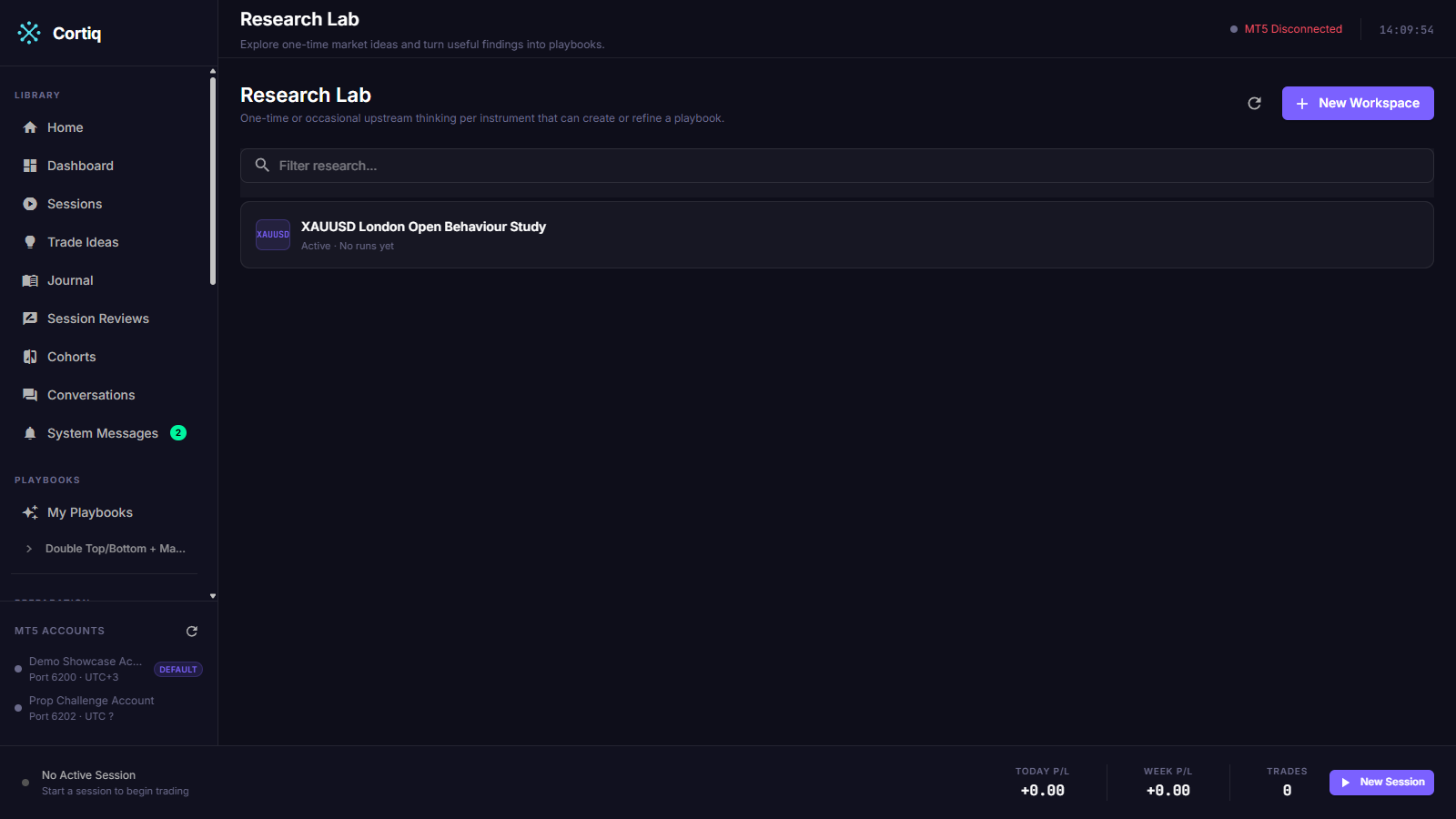
Each button opens a start dialog that collects the run’s inputs before anything begins: the instrument, an optional title, the data file(s) to read, and the type-specific fields — the question to study (Behaviour), the idea to test (Edge), or the exploration mode, seed, and date range (Exploration). Cortiq creates the backing storage invisibly, starts the run, and lands you on its result.
Reading a run’s answer
Section titled “Reading a run’s answer”A completed run leads with the answer, not a wall of data. The result card shows a one-sentence headline, a plain-language confidence line — Confirmed, Provisional, Needs more data, or Did not hold up — and, for grounded runs, a gallery of chart examples paired with a short “what happened” and how each example connects to the conclusion. A typed recommendation sits alongside as a next step.
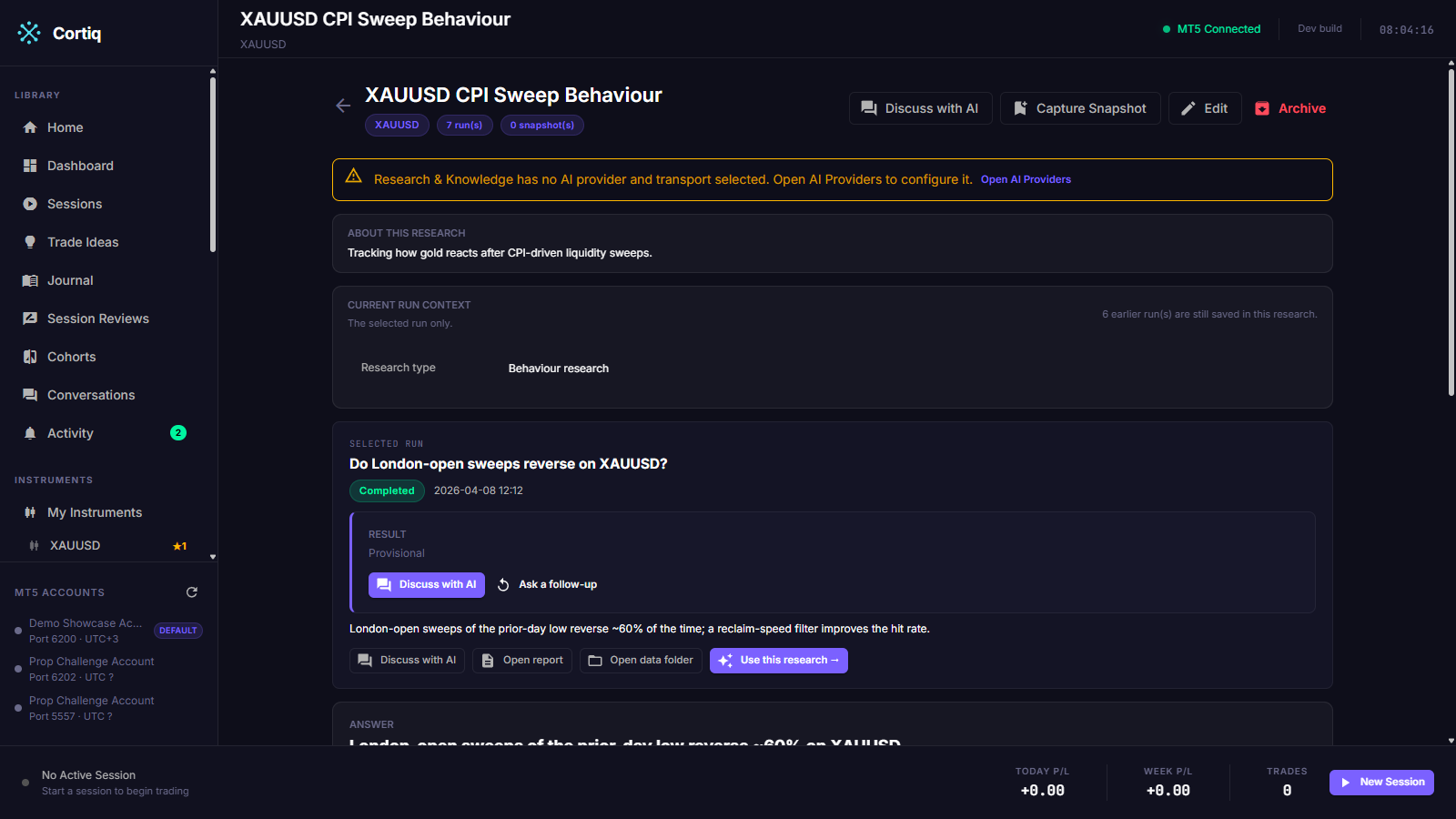
The card offers a few one-click actions:
- Discuss with AI — opens the Copilot with this run’s instrument, title, summary, and result already attached, so you can talk through the finding without re-explaining it.
- Create / refine a playbook — hands the finding to the Copilot to draft or update a playbook.
- Ask a follow-up — continues the analysis in the same research thread.
Everything advanced — the evidence board, the derived validation gates, the run thread, snapshots, and the follow-up box — stays grouped under a Full details / Details section beneath the answer.
Plain language, no jargon
Section titled “Plain language, no jargon”Cortiq maps engine states to plain words. The interface deliberately avoids “OOS”, “out-of-sample”, and “lockbox”:
| Engine concept | Shown as |
|---|---|
| Out-of-sample status | Honest-test verdict (Passed / Failed / Not enough examples / Needs review) |
| Lockbox sample | Examples |
| Expectancy | Avg result (R) |
| Readiness | Confirmed / Provisional / Did not hold up / Needs more data |
Exploration runs
Section titled “Exploration runs”An exploration run is a watch-and-learn historical replay — no playbook, no positions, no execution. It steps an AI through historical candles of one instrument and writes what it notices to the Instrument Hub knowledge ledger as Observations and Learnings.
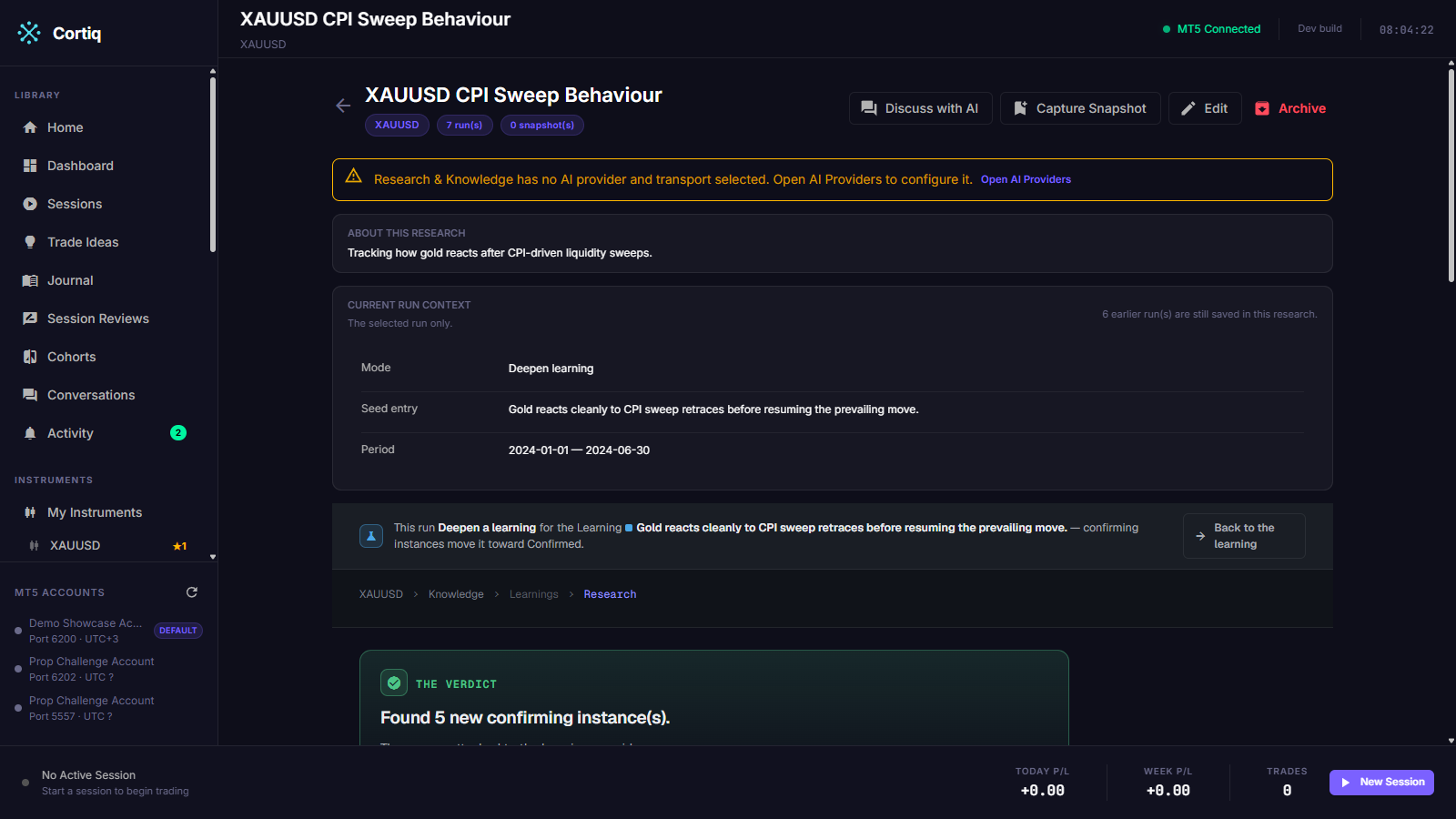
An exploration run has three modes:
- Discover — seeded by an existing Observation, it finds more instances of that pattern, accumulating toward a durable Learning.
- Validate — seeded by a hypothesis, it tests the idea over the period and returns a held or failed verdict.
- Free hypothesis — no seed; it watches the period and proposes new hypotheses.
The exploration detail page has three panels: State (the accumulating learning, the last narration, and carried-forward memory), Candidate instances (each moment the run examined, marked confirmed or rejected with a note), and Script-run audit (every Python script the run authored and ran, with timing and outcome).
How exploration stays safe
Section titled “How exploration stays safe”The AI-authored Python instance-finder runs in a sandbox whose inputs are parquet files only. It never imports MetaTrader5, opens a socket, or reaches a broker. The Cortiq host is the only component that talks to MT5 — it exports the candle history to parquet first, then runs the finder as a confined child process with no network access and no filesystem reach beyond its own scratch folder. The no-execution guarantee is structural, not a policy the model is asked to respect.
Re-run and fix
Section titled “Re-run and fix”A terminal exploration run exposes two actions. Re-run repeats the run, optionally with a one-line steer you type in. Fix with AI — shown for failed runs — feeds the failed script and its captured error back to the AI and asks for a corrected script. Both overwrite the run in place.
Edge discovery — opt-in guardrails
Section titled “Edge discovery — opt-in guardrails”By default a run is free research with no constraints. To pin an Edge run down, turn on Add guardrails (optional), which reveals preset pickers — no hand-typed format strings:
- Session — Whole day, London open, NY open, Asia, or Custom.
- Risk — 1R stop-target, ATR stop, or Custom.
- Setup — Any, or a named setup family.
- Require at least N examples — a minimum sample size.
A preset left at its non-narrowing value (Whole day, Any, blank) is dropped, so the frozen record holds only the lines you actually narrowed. An Advanced sub-section sets the honest-test hold-back percentage — the chronological out-of-sample split.
With guardrails on, the run executes as three sequential phases in one session: freeze the locked constraints and propose train-only hypotheses, build the scoring and threshold plan, then run the chronological honest test and draft a playbook or rejected ideas.
Hand a finished run to the Copilot
Section titled “Hand a finished run to the Copilot”Beyond Discuss with AI, a completed run with artifacts exposes:
- Open report — reveals
report.mdin your file explorer. - Open data folder — reveals the run’s artifact folder.
- Use this research → — seeds the Copilot with the run’s summary and findings, names the saved file paths, and asks which downstream asset to create or update: a Playbook, an Instrument Profile, or Preparation notes. The Copilot drives the chosen path through its tools and the approval gate; preparation notes land in
prep-notes.mdin the run’s folder.
Reference
Section titled “Reference”On-disk artifact bundle
Section titled “On-disk artifact bundle”Each completed run writes a best-effort bundle to disk. A failed disk write is logged and never fails the run — the database stays the source of truth.
| File | Contents |
|---|---|
report.md | The run’s markdown summary and output. |
candles_<timeframe>.parquet | Raw MT5 candles per timeframe (D1, H4, H1, M15). |
meta.json | Symbol, workspace ID, run ID, timestamps, model name. |
prep-notes.md | Written when a hand-off creates preparation notes. |
| Chart PNGs | Grounded-run charts referenced by the answer card. |
Read-only tools during a run
Section titled “Read-only tools during a run”Research and exploration runs get a read-only tool surface. Any tool that would change state — trade execution, session management, settings — is filtered out, so a run can inspect your data but never act on your account.
Current boundaries
Section titled “Current boundaries”- The deterministic edge-discovery engine isn’t built yet. Research reasons over the structured prompt and the supplied data, and marks untested ideas as hypotheses or insufficient sample.
- Grounded finder execution (sandbox plus chart ingest) is wired for the Exploration path today; Behaviour and Edge runs remain pure-AI passes.
- Every follow-up run re-collects fresh MT5 data and applies the same loud empty-data guard.
Common questions
Section titled “Common questions”Why do I have to prepare a data file before running? So every run reads the same inspectable dataset. You build a file once, confirm its preview, and reuse it across runs instead of re-authoring data each time.
Can my typed instructions override Cortiq’s research rules? No. Operator text is treated as untrusted notes. It can’t move the frozen guardrails, upgrade a hypothesis without evidence, or bypass the prompt and tool-use rules.
Can an exploration run place a trade? No. It has no playbook and no position book, and its instance-finder runs in a network-denied sandbox that can’t reach MT5. The no-execution property is enforced by construction.
What to read next
Section titled “What to read next”- Instrument Hub — where research findings land as ledger entries and shape the ★ rating.
- Skills — reusable instruction templates you can inject into a run.
- Playbooks & data — the playbook a finished run can become.