Instrument Hub
The Instrument Hub is where you orient around one market. It gathers everything Cortiq already holds for a symbol — playbooks, sessions, backtests, research, the instrument profile, sentiment, and an append-only knowledge ledger — into a single page, headed by an honest ★ mastery rating. By the end of this page you’ll know what the rating means, how the maturity pipeline and knowledge ledger work, and how to group alternative symbol names for the same market.
Cortiq is built around mastering one instrument at a time. The Instrument Hub is the home screen for that mastery: it answers “how well do I actually know this market, and what should I do next?” for a single symbol.
What this is
Section titled “What this is”The Hub has two surfaces:
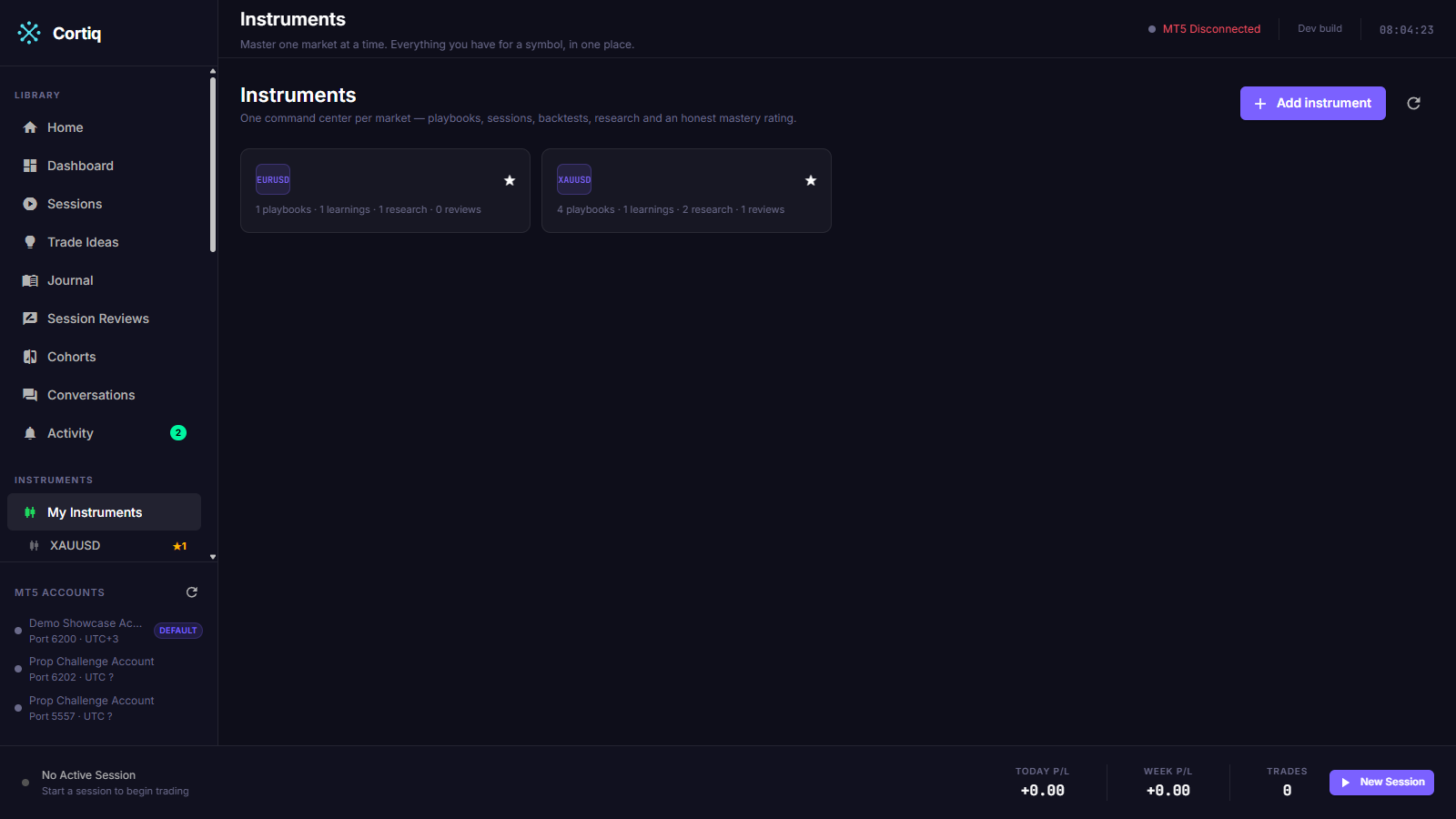
- The Instruments list (
/instruments) — one card per market you’ve done work on. - The Instrument Hub detail (
/instruments/{symbol}) — the command center for a single symbol.
The list shows only markets that already have at least one stored artifact — a session, backtest, research run, profile, sentiment report, or knowledge entry. It never invents empty markets. To start a brand-new market before any work exists, use Add instrument, pick the broker symbol, and Cortiq opens an empty Hub for it.
The Hub is a read-and-orient surface. It doesn’t create or edit artifacts itself — it links you out to the surfaces that do. What it adds on top of aggregation is judgment: an honest rating, a maturity pipeline, a knowledge ledger, curated highlights, and a short “what to dig into next” list.
How it fits into Cortiq
Section titled “How it fits into Cortiq”Every other surface produces work scoped to a symbol. The Hub reads that work back:
| Surface | Feeds the Hub |
|---|---|
| Playbooks & data | The playbooks whose maturity drives the pipeline and the ★ rating |
| Sessions | Live and virtual trading history, and the notes distilled from it |
| Backtesting | Historical validation runs and their reviews |
| Research | Behaviour, edge, and exploration runs, and their findings |
| Session review | Durable lessons written back to the ledger |
The Hub makes no new AI or MetaTrader 5 calls of its own. It reads what already exists and presents it.
The honest ★ rating
Section titled “The honest ★ rating”The headline of every Hub is a ★ rating. It equals the number of playbooks you’ve promoted to Production maturity for that market — and nothing else.
Research volume, learning count, session count, and backtest count can’t move it. A market with heavy research but no Production playbook shows ★ 0 · Not yet mastered. A market with two Production playbooks shows ★★, whatever else is or isn’t there.
This is deliberate. Mastery is measured by rules you trust enough to run for real, not by how much activity a market has accumulated. The rating span carries a tooltip that says so, and a plain-language line beneath the headline tells you the next move: start research or a backtest when there are no playbooks yet, or promote your best playbook when you have some but none are in Production.
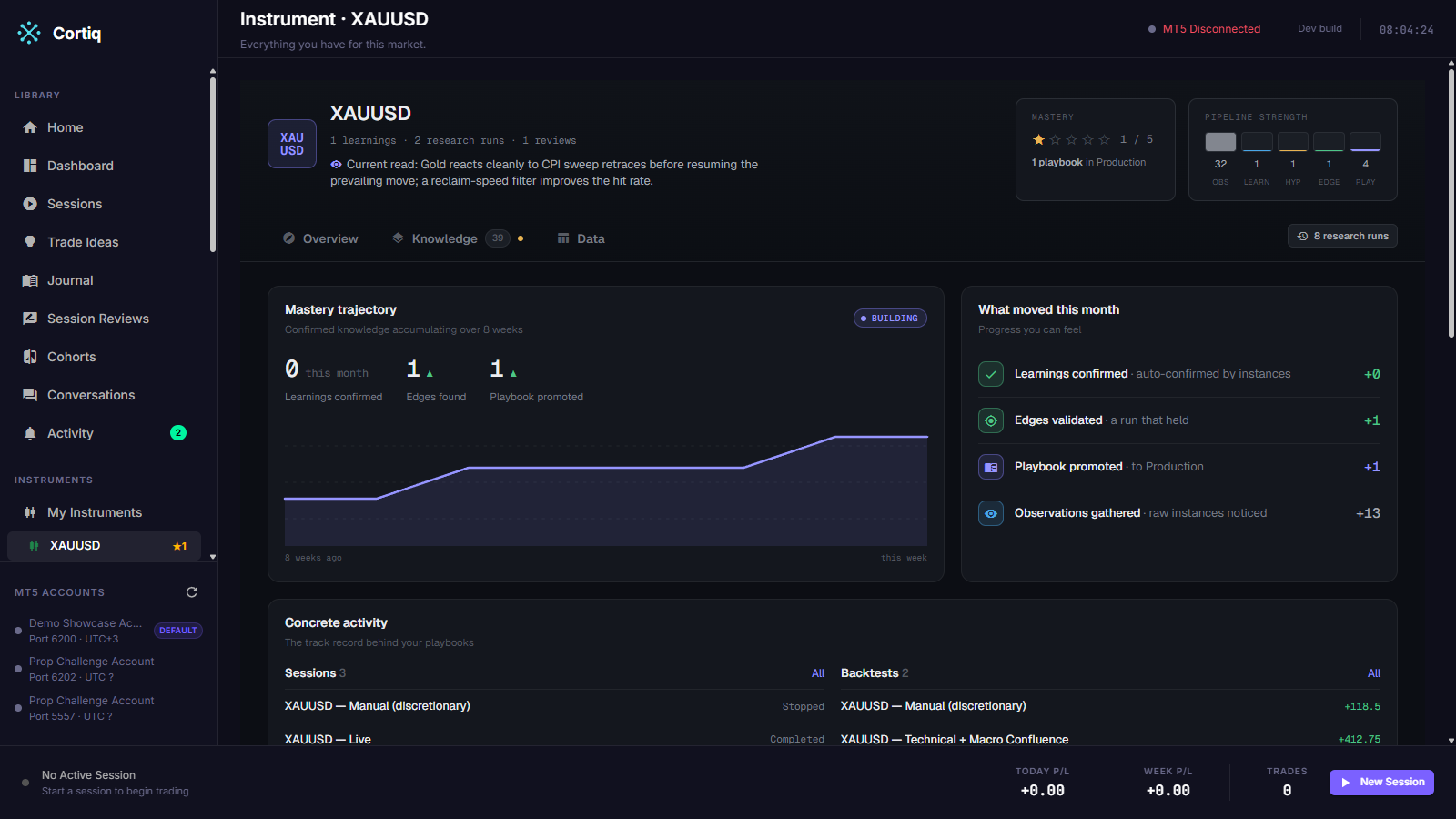
A separate knowledge-depth chip (for example, 14 learnings · 6 research runs · 3 reviews) sits beside the rating. It’s descriptive only — it summarizes activity and has no path to the rating.
The maturity pipeline
Section titled “The maturity pipeline”Below the headline, the Hub renders every playbook for the market across four lanes:
| Lane | Meaning |
|---|---|
| Draft / Hypothesis | Not yet validated. The default for a new playbook. |
| Backtested | Has backtest validation evidence. |
| Sessions | Has live or virtual session evidence. |
| Production | Promoted, trusted, and counted toward the ★ rating. |
You set each playbook’s stage yourself, from the playbook’s detail page — stages don’t advance automatically from evidence. Only playbooks in the Production lane move the ★ rating. Each chip in the pipeline links to its playbook and shows a short evidence string (the most recent matching backtest, where one exists).
A playbook belongs to a market when the symbol appears in its Preferred symbols list, matched as a whole token and case-insensitively.
Knowledge ledger
Section titled “Knowledge ledger”The Hub keeps an append-only knowledge ledger for the market: a running evidence trail of what you’ve noticed and what you’ve learned. Each entry is one of two kinds:
- An Observation — a single noticed instance.
- A Learning — a lesson seen across several instances, where the repetition is what makes it a lesson.
Every entry records where it came from (Research, Live, Backtest, or Manual), the data period it draws on, a data-extent note (for example, 3y D1, ~210 instances), and a confidence weight. A Learning cites the Observations behind it. The feed is filterable by type and source.
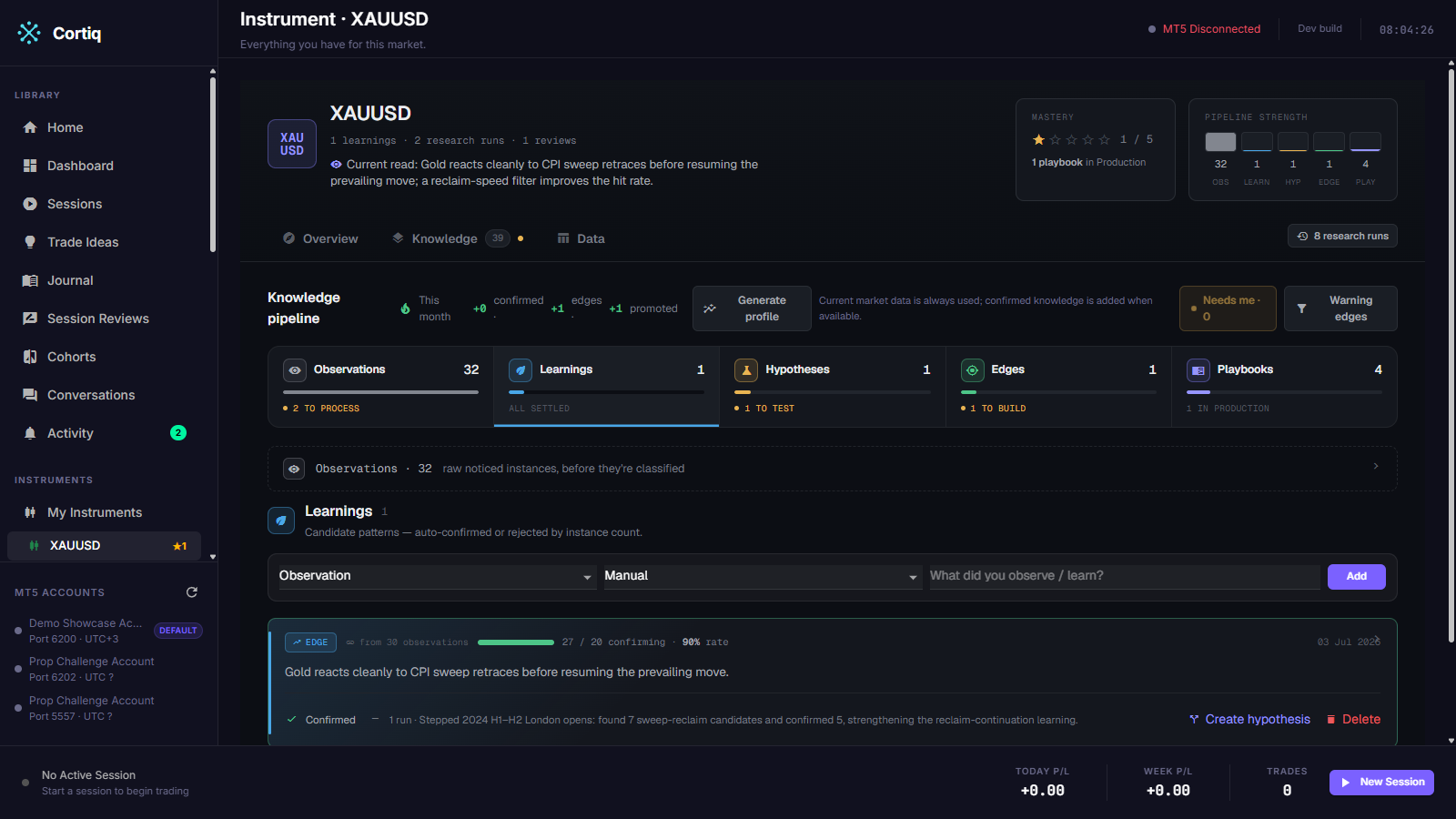
The ledger fills two ways:
- Automatically, from runs. During each live session and backtest, the AI’s notes and your attention flags accumulate. At the end of the run, Cortiq distills them into ledger entries. Provenance is weighted so evidence you can’t lean on hard stays low: live entries carry a low confidence band, and backtest entries a higher one, and the bands never overlap — a one-week live read always ranks below any backtest entry.
- Manually. Add an Observation or a Learning from the inline quick-add in the feed, or let the Copilot write one behind the approval gate.
Each Observation in the feed carries a Start research action that deep-links into a research run pre-scoped to the market, so a single noticed instance can become the seed of a deeper study in one click.
Seeing the evidence on a chart
Section titled “Seeing the evidence on a chart”Every instance attached to a Learning can be expanded onto the candles it describes.
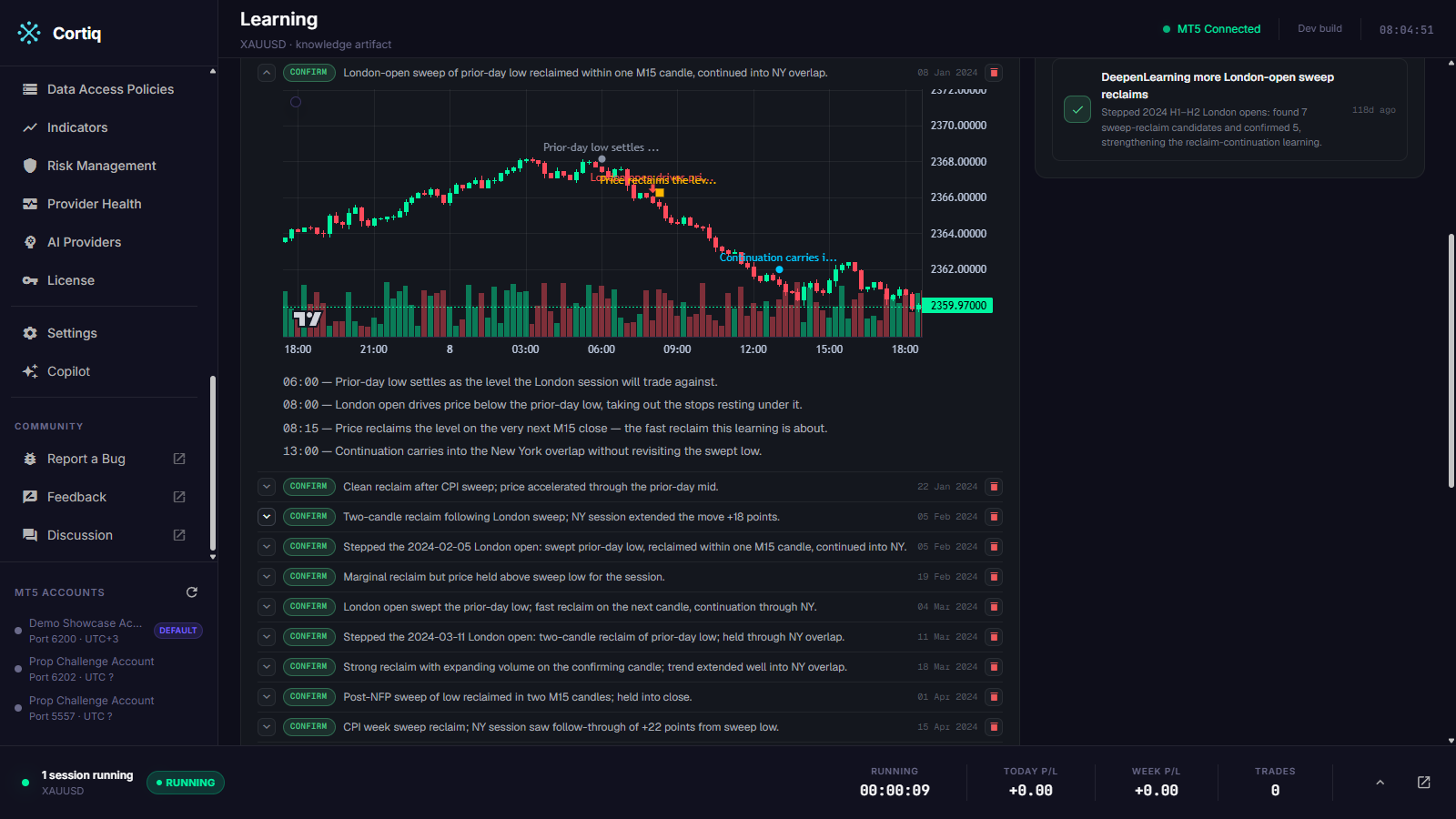
Where the AI’s write-up narrates several moments — a level forming, a sweep, a reclaim, the outcome — the chart marks each one and pairs it with its own timestamped sentence, so you can check the claim against the price action rather than taking the prose on trust. Instances that argue against the Learning are kept in the list and marked as rejecting, not dropped. See Charting for the marker vocabulary.
Curated knowledge and suggestions
Section titled “Curated knowledge and suggestions”Above the raw feed, the Hub shows two lighter-weight panels:
- Curated knowledge — a tidied view of the market’s current read, seeded from your most recent Learnings. Each claim cites the ledger entries behind it and shows its confidence and data period, so nothing reads as unsupported opinion.
- What to dig into next — a short, deterministic suggestion list built from the data already on the page. It nudges you to start research on an untouched market, promote a playbook that’s stuck below Production, review a backtest that has no review yet, or refresh a Learning that’s past its review date. Each suggestion deep-links to the surface that acts on it.
Alternative symbol names
Section titled “Alternative symbol names”Brokers name the same market differently — GOLD versus XAUUSD, GERMANY40 versus DAX. The Hub lets you attach those aliases to one canonical symbol, and then treats the whole group as one instrument.
To manage aliases, use the inline Alternative symbols editor on the Hub detail page. Once GOLD is attached to XAUUSD:
- The Instruments list collapses both into a single card.
- The detail page aggregates sessions, backtests, research, profiles, sentiment, reviews, and ledger entries from every symbol in the group.
- New manual ledger entries are stored under the canonical symbol, even when you add them while viewing the alias.
Attaching an alias doesn’t rewrite your history. Existing rows keep their original symbol text; the Hub merges them when it reads.
Reference
Section titled “Reference”What each panel reads
Section titled “What each panel reads”| Panel | Source |
|---|---|
| ★ rating | Count of Production-maturity playbooks whose preferred symbols include the market |
| Maturity pipeline | Every matching playbook, placed in one lane by its maturity |
| Sessions / Backtests / Research | The symbol group’s sessions, backtest runs, and research runs |
| Profile / Sentiment headline | The newest non-empty instrument profile and sentiment report for the group |
| Knowledge ledger | All ledger entries for the group, newest first |
| Curated knowledge | A persisted curated document, or a read-only seed built from recent Learnings |
| What to dig into next | Deterministic suggestions derived from the counts above |
Maturity stages
Section titled “Maturity stages”| Stage | Counts toward ★ |
|---|---|
| Draft / Hypothesis | No |
| Backtested | No |
| Sessions | No |
| Production | Yes |
Current boundaries
Section titled “Current boundaries”- Maturity is set by you, not inferred. There’s no automatic promotion from evidence yet.
- The ★ rating is intentionally a count, not a weighted score.
- The “what to dig into next” list is a fixed set of deterministic suggestions — there’s no ranking engine or charting on this surface yet.
Common questions
Section titled “Common questions”Why does a market with tons of research still show ★ 0? Because the rating counts only Production playbooks. Research, learnings, sessions, and backtests build the evidence you need to trust a playbook, but promoting one to Production is the deliberate step that earns a star.
How do I raise the rating? Promote a playbook to the Production stage from the playbook’s detail page. The maturity pipeline on the Hub shows which playbooks are candidates.
Do aliases merge my old data?
They merge it at read time. Your historical rows keep their original symbol; the Hub groups them so GOLD and XAUUSD read as one market.
What to read next
Section titled “What to read next”- Playbooks & data — the playbooks whose promotion moves the ★ rating.
- Research — the idea lab that feeds the ledger and drafts new playbooks.
- Session review — the other loop that writes durable lessons into the ledger.